

N case status in 2026. You will find step-by-step process instructions, current fees in AED, required documents and timelines based on official UAE government sources. Whether you are a new resident or an existing visa holder, this guide gives you the exact information needed to navigate the process confidently.
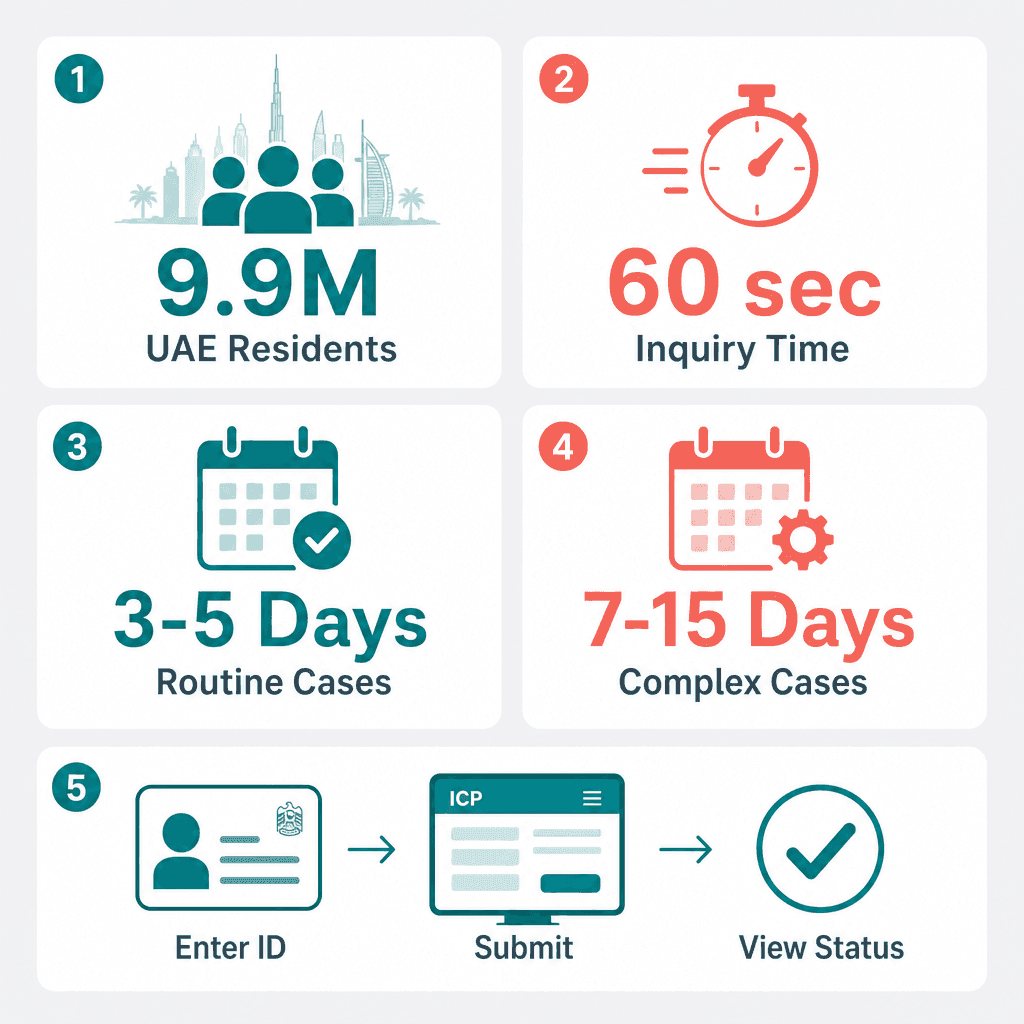
In 2026, the Federal Authority for Identity, Citizenship, Customs and Port Security (ICP) manages residency and immigration records for over 9.9 million UAE residents through its portal at icp.gov.ae (ICP UAE, 2026). The authority processes visa and residency applications across all seven emirates, with routine cases resolved within 3-5 working days and complex cases within 7-15 working days (ICP UAE, 2026). A case inquiry by emirates id on icp.gov.ae takes under 60 seconds, requires no login, and is available 24/7 in both English and Arabic. ICP's customer service line, 600 522222, operates Sunday to Thursday from 7:30am to 3:30pm for cases that need direct follow-up.
This guide covers exactly how to perform a case inquiry by emirates id, passport number, or application reference number, what each ICP case status type means, how long processing takes, and what to do if your case is delayed or rejected. Whether you're a UAE resident tracking your own residency renewal, an employer monitoring employee visa cases, or a new arrival following up on an entry permit, you'll find specific steps, portal URLs, and 2026 timelines here. For a broader overview of ICP digital services, see our ICP smart services UAE guide.
What Is an ICP Case Inquiry
An ICP case inquiry is an official status check on a pending immigration application or proceeding managed by the Federal Authority for Identity, Citizenship, Customs and Port Security (ICP) at icp.gov.ae. It accepts an Emirates ID number, passport number plus nationality, or a case reference number to return real-time application status. It's free, requires no account, and reflects the live state of your file inside ICP's processing system.
ICP Case Inquiry vs Emirates ID Status Check - the Key Difference
This distinction trips up a lot of residents. An ICP case inquiry tracks the progress of a visa application, entry permit, residency renewal, or immigration proceeding. It tells you where your application stands in ICP's processing queue. The Emirates ID status check, also on icp.gov.ae, is a completely separate function, it only tells you whether your physical Emirates ID card has been printed and dispatched by the Emirates Identity Authority.
You can have an approved immigration case but still see "Under Printing" on your Emirates ID status. Both readings are correct; they refer to two different stages of the same overall process. A resident who renewed their residency visa, for example, may see "Approved" on their ICP case inquiry while the Emirates ID status still shows "Under Printing", the visa approval came first, the card production follows. Always use the Case Inquiry section under Inquiries on icp.gov.ae, not the Emirates ID Status section, when you want to check a visa or residency application. ICP manages records for over 9.9 million UAE residents (ICP UAE, 2026), so the portal path matters: icp.gov.ae, then Inquiries, then Case Inquiry.
What Information Does an ICP Case Inquiry Show
A single case inquiry by emirates id returns several data points at once:
Current status: Pending, Under Review, Approved, Rejected, or Requires Additional Documents
Case type, residency visa, entry permit, Emirates ID, status change, or renewal
Rejection reason, displayed directly in the portal when applicable
Date of last status update and the next expected action
An employer checking a new hire's entry permit will see the exact status and any outstanding document requirements, without calling ICP customer service at 600 522222 (Sunday to Thursday, 7:30am to 3:30pm). The portal is available in both English and Arabic, and the data it returns is live, not cached.
How to Do a Case Inquiry Using Emirates ID - Step by Step
To do a case inquiry by emirates id, go to icp.gov.ae, click Inquiries, select Case Inquiry, choose Emirates ID as your search method, enter your 15-digit Emirates ID number, and click Search. Your current immigration case status appears immediately on screen, no login or fee required. This is the fastest method for any UAE resident who already holds an Emirates ID card. For a related walkthrough, see our Emirates ID status check guide.
Step-by-Step: Case Inquiry by Emirates ID on icp.gov.ae
Open icp.gov.ae in any browser. The portal is available in English and Arabic, select your preferred language from the top-right menu before proceeding.
Click the "Inquiries" tab in the main navigation bar at the top of the page.
Select "Case Inquiry" from the dropdown list that appears.
Choose "Emirates ID Number" as your search identifier from the available options.
Enter your 15-digit Emirates ID number in the format 784-XXXX-XXXXXXX-X and click Search.
Your ICP case status appears on the results screen within seconds. A UAE resident renewing their 3-year residency visa, for instance, can confirm their application moved from "Under Review" to "Approved" without visiting any ICP service centre. No login is required for a basic case inquiry by emirates id, and the service runs 24/7 on icp.gov.ae.
A five-step process showing how to check your ICP case status using your Emirates ID number on the ICP portal, from opening the website to viewing results. Case Inquiry by Emirates ID, icp.gov.ae (2026) 1Openicp.gov.ae 2ClickInquiries 3SelectCase Inquiry 4Enter EmiratesID Number 5View LiveCase Status
What You Need Before You Search
Your 15-digit Emirates ID number, printed on the front of your Emirates ID card in the format 784-XXXX-XXXXXXX-X
Alternatively, your application or case reference number from the original submission confirmation
No fee applies for a standard ICP case inquiry online
An expired Emirates ID card does not block portal access, the number remains valid for inquiries even after the card's physical expiry date
First-time users sometimes enter their Emirates ID number with hyphens removed. Both formats, with and without hyphens, are accepted in the ICP portal search field. The portal path is always icp.gov.ae, then Inquiries, then Case Inquiry.
How to Check ICP Case Status Using Passport Number
To check ICP case status using a passport number, go to icp.gov.ae, click Inquiries, select Case Inquiry, choose "Passport Number" as the search method, enter your passport number and select your nationality from the dropdown, then click Search. This method works for new arrivals who do not yet hold an Emirates ID, and it's the standard approach for employers checking a new hire's entry permit before their ID is issued.
Step-by-Step: ICP Case Status Check by Passport Number
Go to icp.gov.ae and select your preferred language, English or Arabic, from the top-right menu.
Click "Inquiries" in the top navigation bar.
Select "Case Inquiry" from the dropdown menu.
Select "Passport Number" as your search method from the available identifier options.
Enter your passport number exactly as printed, no spaces, no hyphens, then select your nationality from the dropdown and click Search.
A new hire joining a Dubai company before their Emirates ID is issued can use their passport number plus nationality to track their entry permit or residency visa application status on icp.gov.ae from day one. The nationality selection is required, without it, the portal cannot return accurate results, since passport numbers are not globally unique across countries. A case reference number is a third alternative if neither an Emirates ID nor a passport is linked to the case yet.
When to Use Case Reference Number Instead
Use your case reference number when you have neither an Emirates ID nor a UAE-linked passport on file with ICP. This situation comes up most often with family sponsorship cases, a family member sponsored from abroad who has not yet entered the UAE can track their entry permit approval using only the case reference number provided at the time of application submission.
The case reference number is provided in the confirmation message or email when a visa application is submitted through a typing centre, employer, or directly through the ICP portal. These numbers are alphanumeric and unique to each individual application. If you've lost yours, ICP customer service at 600 522222 (Sunday to Thursday, 7:30am to 3:30pm) can retrieve it with your full name and date of birth.
How to Check Case Status on the ICP Smart App
The ICP Smart App lets you check your immigration case status under the My Applications section after logging in with your UAE Pass credentials. The app is free, available on iOS and Android, and displays the same real-time case data as icp.gov.ae, including status type, case category, and last update date. It's particularly useful for anyone managing multiple applications at once. For more on ICP digital tools, visit our ICP smart services UAE guide.
Step-by-Step: Case Inquiry on the ICP Smart App
Download the ICP Smart App from the Apple App Store or Google Play Store, search "ICP Smart Services".
Log in using your UAE Pass digital identity credentials.
Tap "My Applications" from the home dashboard.
Select the relevant application from your list to view full case status details.
Tap any case to see status type, case number, and any outstanding document requirements.
A business owner managing multiple employee visa applications can check all pending ICP cases from a single ICP Smart App dashboard rather than running individual portal searches for each employee. The app is free on both iOS and Android, and UAE Pass login is required to access the My Applications section.
ICP Case Status Types, Meanings, and Next Actions (2026)
Status Type | What It Means | Next Action Required |
|---|---|---|
Pending | Application received and queued for officer assignment. File is in the system but not yet actively reviewed. | No action needed. Check icp.gov.ae again after 1-2 working days. |
Under Review | An ICP officer is actively assessing the application. Routine cases clear in 3-5 working days; complex cases in 7-15 working days (ICP UAE, 2026). | No action needed unless status changes to Requires Additional Documents. |
Approved | Application cleared. Visa, entry permit, or Emirates ID will be issued. No further processing required. | No action needed. Await visa sticker, Emirates ID card, or entry permit as applicable. |
Rejected | Application declined. Rejection reason is displayed in the case details screen in English and Arabic on icp.gov.ae. | Read the rejection reason. Appeal or resubmit within 30 days (ICP UAE, 2026). |
Requires Additional Documents | ICP has paused processing. A specific document is named in the portal and must be submitted before the case can continue. | Upload the named document directly on icp.gov.ae or visit the nearest ICP service centre. Respond promptly to avoid automatic rejection. |
ICP Smart App vs icp.gov.ae Portal - Which to Use
The ICP Smart App requires a UAE Pass login but gives you a personalised dashboard showing all applications linked to your identity. icp.gov.ae requires no login for a basic case inquiry, just your Emirates ID, passport number, or case reference. Both channels show identical real-time ICP case data, and both are available in English and Arabic.
Use icp.gov.ae when you're checking a case for someone else, an employee or family member, using their ID or passport details. Use the ICP Smart App when you want a consolidated view of all your own active applications and renewals in one place. HR managers typically use icp.gov.ae to check employee visa cases by passport number, while individual residents tend to prefer the ICP Smart App for tracking personal residency or Emirates ID applications.
ICP Case Status Types and What They Mean
ICP case status types are Pending, Under Review, Approved, Rejected, and Requires Additional Documents. Pending means the application is queued. Under Review means an ICP officer is actively assessing it. Approved means the case is cleared. Rejected means the application was declined with a reason shown in the portal. Requires Additional Documents means action is needed from the applicant before processing can continue.
What 'Under Review' Means on Your ICP Case
"Under Review" is the active processing stage, an ICP officer has the file and is assessing it against UAE immigration requirements. Routine cases move from "Under Review" to "Approved" within 3-5 working days (ICP UAE, 2026). A standard 2-year employment visa renewal, for example, typically shows "Under Review" for around 3 working days before the status flips to "Approved", no intervention needed during that window.
Complex cases, those involving criminal record checks, medical screenings, or security clearances, can remain "Under Review" for 7-15 working days (ICP UAE, 2026). No applicant action is required during this stage unless the status changes to "Requires Additional Documents". Checking your case inquiry by emirates id once a day is sufficient; there's no benefit to checking more frequently during this stage.
What 'Requires Additional Documents' Means and What to Do
This status means ICP has paused processing and is waiting for the applicant or sponsor to submit a specific document. The required document is named in the portal, log in to icp.gov.ae or check the ICP Smart App under My Applications to see exactly what is needed. A residency renewal flagged "Requires Additional Documents" most commonly requests an updated medical fitness certificate; uploading it directly through icp.gov.ae typically resumes processing within 1-2 working days.
You can upload documents directly on icp.gov.ae or visit the nearest ICP service centre with the original. Failing to respond within the specified timeframe can result in automatic rejection, so treat this status as time-sensitive. Call ICP customer service at 600 522222 if you're unsure which document is required or how to obtain it.
What Types of Cases Are Tracked on ICP
The ICP case inquiry portal at icp.gov.ae tracks residency visa applications, entry permits, Emirates ID applications and renewals, status change requests, and visa cancellations. All cases linked to your Emirates ID number or passport number are visible in a single search, covering both current and recently closed proceedings. ICP tracks cases across all seven emirates on a single national platform.
Full List of ICP Case Types You Can Track
Residency visa applications, new issuance, renewal, and transfer of sponsorship
Entry permits, for new hires, family members, and domestic workers arriving from abroad
Emirates ID applications and renewals, separate from the ID status check but visible in the same portal
Status change requests, changing visa category, switching sponsors, or adjusting residency type
Visa cancellations, employer-initiated or voluntary cancellations by the resident
An employee transferring sponsorship from one Dubai employer to another can track both the cancellation of the old visa and the issuance of the new entry permit as two separate active cases on icp.gov.ae simultaneously. That visibility is genuinely useful, it removes the guesswork about which stage each process is at.
ICP vs GDRFA - Which System Tracks Your Case
ICP (icp.gov.ae) is the federal authority covering identity, Emirates ID, and immigration cases across all UAE emirates. The General Directorate of Residency and Foreigners Affairs Dubai, or GDRFA Dubai (gdrfad.gov.ae), is the Dubai-specific authority for residency and entry. Some Dubai residency cases are processed through GDRFA first before syncing to ICP's federal system. For Abu Dhabi, Sharjah, and the other five emirates, ICP is the sole tracking portal.
A new employee sponsored by a Dubai mainland company may need to check gdrfad.gov.ae for their entry permit status first, then icp.gov.ae once the case transfers to federal processing for Emirates ID issuance. If your immigration case UAE search on icp.gov.ae returns no results, check gdrfad.gov.ae, particularly for employer-sponsored residency cases in Dubai.
Is the ICP case inquiry portal the same as the GDRFA portal?
No. icp.gov.ae is the federal ICP portal covering all seven emirates for identity and immigration cases. gdrfad.gov.ae is the Dubai-specific GDRFA portal handling some Dubai residency and entry permit cases before they transfer to the federal ICP system. For non-Dubai cases, use icp.gov.ae exclusively. For Dubai employer-sponsored visas, check both portals if your case does not appear on icp.gov.ae.
How Long Does ICP Case Processing Take
ICP processes routine immigration cases within 3-5 working days and complex cases within 7-15 working days (ICP UAE, 2026). Timelines vary by case type: entry permit approvals typically take 3-5 working days, Emirates ID renewals 5-7 working days, and cases requiring additional screening or medical checks up to 15 working days. Knowing these benchmarks helps you decide when to check your ICP case status and when to escalate.
ICP Processing Timelines by Case Type (2026)
Entry permit for new employee or family member: 3-5 working days from submission (ICP UAE, 2026)
Residency visa renewal for existing residents: 3-5 working days for standard cases
Emirates ID new application linked to residency: 5-7 working days for card production and delivery
Status change or sponsorship transfer: 5-10 working days depending on employer documentation
Cases requiring medical fitness certificate or security clearance: 7-15 working days (ICP UAE, 2026)
A domestic worker entry permit submitted through a UAE typing centre typically receives ICP approval within 4 working days, the employer can confirm this on icp.gov.ae using the case reference number provided at submission. That's a useful benchmark: if day 5 arrives with no status change, it's worth a quick check to confirm the case is still "Under Review" and hasn't moved to "Requires Additional Documents" without a notification reaching you.
When to Contact ICP If Processing Exceeds the Standard Timeline
Contact ICP customer service at 600 522222 if your case has been "Under Review" for more than 15 working days without a status change. Have your Emirates ID number, passport number, and case reference number ready before calling, agents need all three to locate your file quickly. Operating hours are Sunday to Thursday, 7:30am to 3:30pm.
A residency renewal sitting at "Under Review" for 18 working days without any update warrants that call, agents can flag the case for expedited review if no additional documents are outstanding. ICP also accepts enquiries through the live chat function on icp.gov.ae and through the ICP Smart App messaging feature, so you have three contact channels available if phone lines are busy.
ICP Case Processing: Key Numbers at a Glance (2026)
A designer-ready data card summarising ICP case processing timelines, contact details, and resident population figures for UAE immigration guides.
9.9 million UAE residents tracked by ICP (ICP UAE, 2026)
3-5 working days: routine case processing time (entry permits, residency renewals)
7-15 working days: complex case processing (medical checks, security clearances)
30 days: window to appeal or resubmit a rejected ICP case (ICP UAE, 2026)
600 522222: ICP customer service line, Sunday-Thursday 7:30am-3:30pm
24/7: icp.gov.ae portal availability for case inquiry by Emirates ID
Suggested alt text: Infographic showing ICP UAE case processing timelines, resident population, rejection appeal window, and customer service contact details for 2026.
What to Do If Your ICP Case Is Delayed or Rejected
If your ICP case is rejected, the reason is shown directly in the portal at icp.gov.ae. Most rejections can be appealed or resubmitted within 30 days of the rejection date (ICP